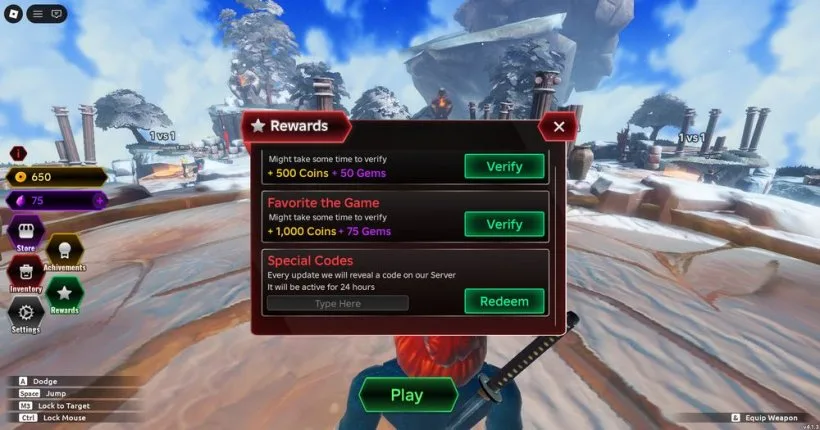
Codes are case-sensitive. Each account can redeem a given string once. This guide has not redeemed the strings inside a live server. Status follows an October 10, 2026 code check, which is newer than July 3, 2026 pages that still called SeasonOneBegins, WarhammerGrounds, and DelayingGrounds2 active.
Redeem a code
- Launch Dueling Grounds.
- Open Rewards from the star icon.
- Select the Special Codes field.
- Paste the string with the same capital letters and no extra spaces.
- Press Redeem.
- Check that the Coin and Gem counters change.
Guides disagree on where the star sits. Some put Rewards on the left. Others put it in the bottom row with PLAY, Weapons, Store, and Settings. One October 4, 2026 page calls the same control a gift icon. Open whichever icon on your screen is labeled Rewards. One October guide says to finish a first fight before the field works. Other redeem write-ups do not. Try the menu first.
The working list and the expired archive are on the codes page. Three strings were still listed as active on October 10, 2026: GemsUpdate, Oathbreaker, and InnovationAwards. A September 10, 2026 note said InnovationAwards may have expired. The later check still lists it, so it stays in the active table and the disagreement is called out there.
Like, Favorite, and the group
These are Roblox actions, not codes. Like pays 500 Coins and 50 Gems. Favorite pays 1,000 Coins and 75 Gems. Joining the Dueling Grounds group pays Coins and Gems, and the amount was not published.
Verify only checks those actions when you join a server. Pressing Verify in the same session returns "Could not verify". Leave, complete the Roblox action, rejoin, press Verify, and wait for the countdown.
A failed code is usually a typo, an extra space, a string that was already redeemed, or a string that has expired. There is no official Trello to check for a replacement code.
How Coins and Gems are spent is covered in Coins, Gems, and the shop.